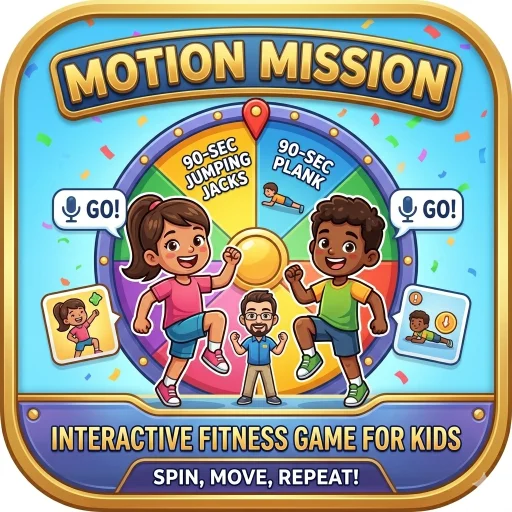
Motion Mission is an interactive fitness game for kids. Spin the wheel to deploy active missions, follow animated guides with voice coaching, and complete 90-second movement objectives!
July 2, 2026 Date app was updated 217 Number of launchesLink & QR Display
Frosted Glassmorphism UI: Features a translucent container layout over a slow-moving, kid-friendly pastel aurora gradient background, providing modern visual depth tailored for elementary-aged students without overstimulating neon colors.
Coach Pingo the Interactive Trainer: Introduces an expressive, custom SVG penguin companion that reacts to the workout in real time—doing the movements along with the user, getting dizzy during wheel spins, sweating during deep countdowns, and donning a gold medal upon mission success.
Dynamic Dimming Chiptune Loop: Implements an energetic, custom-coded retro game soundtrack synthesized natively through the browser's Web Audio API. The loop runs at 100% full volume by default but dynamically scales down by 60% only while the voice coach is speaking, restoring automatically when the speaker finishes.
Accelerating Tempo Countdown Timer: The chiptune track doubles as an auditory countdown mechanism, automatically picking up speed at the 30-second mark and reaching peak game-tempo intensity during the final 15 seconds to drive excitement.
Adaptive Physical Mode Hub: Provides physical inclusivity via toggle configurations for Low Impact and Seated Friendly modes. Toggling immediately translates all exercise titles, icons, descriptions, and Coach Pingo animations to accommodate alternative physical or spatial accessibility needs.
ADHD-Friendly "Calm Focus" Deck: Offers sensory support for neurodiverse children by replacing fast-spinning wheels and flashing shimmers with an elegant, static "Calm Card Deck" flip-reveal, alongside a toggle to swap global font styling to a highly readable Dyslexia font layout.
Web Speech API Voice Coaching & Live Subtitles: Utilizes native voice synthesizers to read instructions and cheer kids on at strategic intervals. It pairs this with a large-text visual subtitle dashboard to assist hard-of-hearing or highly visual learners.
Precise Alignment & Pre-Accept Workflow: A mathematically calibrated spin offset guarantees the wheel always locks cleanly onto the center of a chosen segment. Once stopped, the panel displays the exercise directions instantly, keeping only the media container locked in a shimmering "Mission Loading" loop until the user officially accepts.
Interactive Click Tip & Preview Hub: Includes an animated glowing banner reminder to let students know they can click individual wheel icons at any time to open a preview card detailing that movement before spinning.
Safe-Exit Mission Abandonment: Features a prominent, accessible "Abandon Mission" control button, allowing children to safely back out of a running timer mid-workout, resetting Coach Pingo and returning cleanly to Mission Control.
Google Sites Native Optimization: Architected as a completely self-contained, sandboxed-safe single HTML file requiring zero external database connections or external hosting assets for code, audio generation, and game logic.
Your display name appears as the author on apps you publish. You can change it later in your profile.
Add New App
Save your changes?
You have unsaved changes in this app. Save them, discard them, or keep editing.
Delete app?
This will permanently delete the app. Anyone with the link will no longer be able to load it.
↩
Undo Last Save?
Pause this app?
Duplicate this app
Code and Superpower settings carry over.
Stats, comments, and any saved app data start fresh.
The copy starts as private — turn on Copyable if you want others to copy it.
Leave blank to keep the original name.
.apphive.us
The max character count is 40.
Connected Superpower
An app with the Connected Superpower syncs data live between you and your guests. Build quizzes, games, collaborative stories, submission galleries, shared leaderboards, and more, used by one guest or many at once. Guests just open your link with no login required.
Access your teacher controls by clicking the Teacher button for the app on your My Apps page.
Ready to build? Copy the AI Instructions and paste them into Claude, ChatGPT, or Gemini. Describe what guests see and do, and what you want to see and control as the teacher.
AI
AI Superpower
An app with the AI Superpower generates text or images on demand for whoever opens it. Build reading-level analyzers, story starters, image generators, tutoring feedback, classifiers, and more.
Pick how AI is paid for when you build:
Use My AI Key. Your own OpenAI, Anthropic, or Google account powers the app for everyone who opens it. You set a daily spending cap and the app pauses if costs hit it. Best for apps you share with students.
Use Their AI Key. Each guest pastes their own AI key when they open the app. The key stays only in their browser. You don't pay for AI in this mode. Text and photo input work for everyone; image generation needs an OpenAI or paid Gemini key (not Claude). Best for apps you share with other teachers.
Ready to use it? Copy the AI Instructions for the mode you picked and paste them into Claude, ChatGPT, or Gemini before you build or update your app.
Email Superpower
An app with the Email Superpower can send messages straight to your inbox, including a subject, formatted text, and up to three photos. Build quiz result digests, parent update forms, exit ticket reports, suggestion box submissions, and more.
Emails always go only to you, the app owner. By default they arrive at your Teacher Hive account email, and you can switch the delivery address in your app's settings.
Ready to use it? Copy the AI Instructions and paste them into Claude, ChatGPT, or Gemini, whether you're building a new app or adding email to one you already have.
Make this app copyable?
Your app's URL will change permanently from
to
.
The old URL will redirect to this app's info page where other teachers can preview and copy it.
Anyone with the new URL can use your app and emails still come to your inbox.
Other Pro teachers will see a Make a Copy button on the info page. Their copies send emails to their own inboxes, not yours.
You can turn copyable off later, but the URL won't change back.
Short Link Superpower
The Short Link Superpower turns long, messy web addresses into short link.apphive.us/{slug} links that are easy to read aloud, type on a phone, or write on a board.
Your app can pick the slug or it can be made with 6 random characters. The short link can point somewhere new later without the link itself changing, and it can show how many visits each one has had.
Ready to use it? Copy the AI Instructions and paste them into Claude, ChatGPT, or Gemini, whether you are building a new app or adding short links to one you already have.
Pro Superpower
This Superpower is part of Hive Pro. Upgrade to unlock it for your account.
Tags make your app easier to discover. Add up to 6 keywords about the subject, skill, strategy, or type of activity. Grade level is already set using Target Audience.
Anyone with the link will be able to use it again right away. Stats, code, and data are preserved.
Are you sure you want to delete?
Make a copy with Builder
Copying an app to make it your own is a Hive Builder feature. Builder access is free for educators. Request it and you can copy this app and build your own.