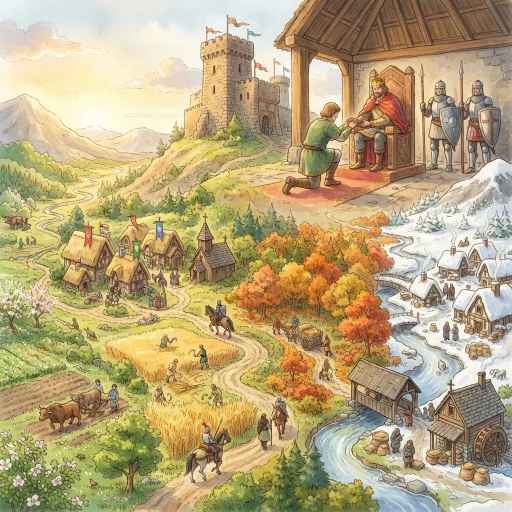
Students become kings, nobles, knights, peasants, or serfs, swear oaths, then lead manors through a year of random crises. Every choice helps one thing and costs another.
November 6, 2026 Date app was updated 23 Number of launchesLink & QR Display
Land for Loyalty turns the feudal system into something students live through instead of memorize. Each student is randomly drawn into a role, with a medieval job, a new surname, and a place on a shared manor map. The class then divides into manors and plays through one year together.
How it works
The draw. Students are called one at a time. A name scroll builds suspense, and each reveal shows their station, trade, and duty.
The oaths. All the nobles swear to the king at the same time. Then the knights, peasants, and serfs swear to their own lords, using homage and fealty and filling in a Land Deed, a Knight’s Grant, or a Protection Card.
The year. Each manor randomly draws its situation, such as the River Manor, Hill Manor, Border Manor, Forest Manor, or Church Manor. It tracks three meters: Food, Safety, and Loyalty. Across four seasons, every manor draws random crises, and each station decides. The nobles prepare and make winter choices. The king sets tribute and may send help. The knights choose how to spend their service. The peasants and serfs vote in autumn. Every option shows its trade-off before you tap it, because every choice helps one meter and costs another. A meter at 0 brings famine, conquest, or rebellion.
The wrap-up. A scoreboard shows which manors thrived, survived, or fell, followed by discussion questions.
What you get
One self-contained HTML file. It runs in your browser and needs no accounts, logins, or student devices.
A printable four-page student guide built into the game: a character card, a manor map, the oath cards, and a summary page with a three-question multiple-choice exit ticket.
On-screen teacher notes for every step, which you can hide while projecting, plus the exit ticket answer key.
Saved progress for four class periods, with a backup code to move between computers.
A “class rule penalty” button that takes 1 point from any manor and category on any screen.
Learning goals
Students will:
Explain why feudalism developed after the fall of Rome.
Describe the land-for-loyalty bargain and the chain from king to serf.
Compare the costs and benefits for each station in the feudal system.
Details
Grade and subject: Grade 7 World History (adaptable for grades 6 to 8)
Standards: Ohio Learning Standards, Grade 7 Social Studies, History Content Statement 3 (the collapse of Rome and the development of feudalism and the manorial system), plus the cost-benefit economics statement
Time: about 2 to 3 class periods of 45 to 50 minutes. It saves your progress, so you can stop and resume.
Class size: works with about 12 to 30 students, in 1 to 3 manors
Materials: a computer with a projector (Chrome recommended), the printed guide, and pencils
Best used: after you have taught the basics of feudalism
Teacher tips
Do a quick dry run with the sample class before using it.
Copy the backup code from the save screen after each class.
Roles are random and never about the student. The notes remind the class of this.
Tags: feudalism, medieval, middle ages, simulation, role play, world history, grade 7, social studies, Ohio standards, review game
Your display name appears as the author on apps you publish. You can change it later in your profile.
Add New App
Save your changes?
You have unsaved changes in this app. Save them, discard them, or keep editing.
Delete app?
This will permanently delete the app. Anyone with the link will no longer be able to load it.
↩
Undo Last Save?
Pause this app?
Duplicate this app
Code and Superpower settings carry over.
Stats, comments, and any saved app data start fresh.
The copy starts as private — turn on Copyable if you want others to copy it.
Leave blank to keep the original name.
.apphive.us
The max character count is 40.
Connected Superpower
An app with the Connected Superpower syncs data live between you and your guests. Build quizzes, games, collaborative stories, submission galleries, shared leaderboards, and more, used by one guest or many at once. Guests just open your link with no login required.
Access your teacher controls by clicking the Teacher button for the app on your My Apps page.
Ready to build? Copy the AI Instructions and paste them into Claude, ChatGPT, or Gemini. Describe what guests see and do, and what you want to see and control as the teacher.
AI
AI Superpower
An app with the AI Superpower generates text or images on demand for whoever opens it. Build reading-level analyzers, story starters, image generators, tutoring feedback, classifiers, and more.
Pick how AI is paid for when you build:
Use My AI Key. Your own OpenAI, Anthropic, or Google account powers the app for everyone who opens it. You set a daily spending cap and the app pauses if costs hit it. Best for apps you share with students.
Use Their AI Key. Each guest pastes their own AI key when they open the app. The key stays only in their browser. You don't pay for AI in this mode. Text and photo input work for everyone; image generation needs an OpenAI or paid Gemini key (not Claude). Best for apps you share with other teachers.
Ready to use it? Copy the AI Instructions for the mode you picked and paste them into Claude, ChatGPT, or Gemini before you build or update your app.
Email Superpower
An app with the Email Superpower can send messages straight to your inbox, including a subject, formatted text, and up to three photos. Build quiz result digests, parent update forms, exit ticket reports, suggestion box submissions, and more.
Emails always go only to you, the app owner. By default they arrive at your Teacher Hive account email, and you can switch the delivery address in your app's settings.
Ready to use it? Copy the AI Instructions and paste them into Claude, ChatGPT, or Gemini, whether you're building a new app or adding email to one you already have.
Make this app copyable?
Your app's URL will change permanently from
to
.
The old URL will redirect to this app's info page where other teachers can preview and copy it.
Anyone with the new URL can use your app and emails still come to your inbox.
Other Pro teachers will see a Make a Copy button on the info page. Their copies send emails to their own inboxes, not yours.
You can turn copyable off later, but the URL won't change back.
Short Link Superpower
The Short Link Superpower turns long, messy web addresses into short link.apphive.us/{slug} links that are easy to read aloud, type on a phone, or write on a board.
Your app can pick the slug or it can be made with 6 random characters. The short link can point somewhere new later without the link itself changing, and it can show how many visits each one has had.
Ready to use it? Copy the AI Instructions and paste them into Claude, ChatGPT, or Gemini, whether you are building a new app or adding short links to one you already have.
Pro Superpower
This Superpower is part of Hive Pro. Upgrade to unlock it for your account.
Tags make your app easier to discover. Add up to 6 keywords about the subject, skill, strategy, or type of activity. Grade level is already set using Target Audience.
Anyone with the link will be able to use it again right away. Stats, code, and data are preserved.
Are you sure you want to delete?
Make a copy with Builder
Copying an app to make it your own is a Hive Builder feature. Builder access is free for educators. Request it and you can copy this app and build your own.