What if every student in your classroom could instantly share ideas, photos, links, recordings, and reflections on a collaborative digital board without creating accounts or remembering passwords?
Meet Sticky Hive, a free app that's a little different from most Teacher Hive apps. It uses the Connected Superpower to sync data between the teacher and students.
Because Sticky Hive stores data, teachers begin by making their own copy of the app. This keeps boards, notes, and settings organized within their personal version of Sticky Hive. Inside your copy, you can create more than 100 boards.
To see what a board looks like, view the Sample Board as a student. Or, click the Preview button and toggle between Guest and Teacher views.
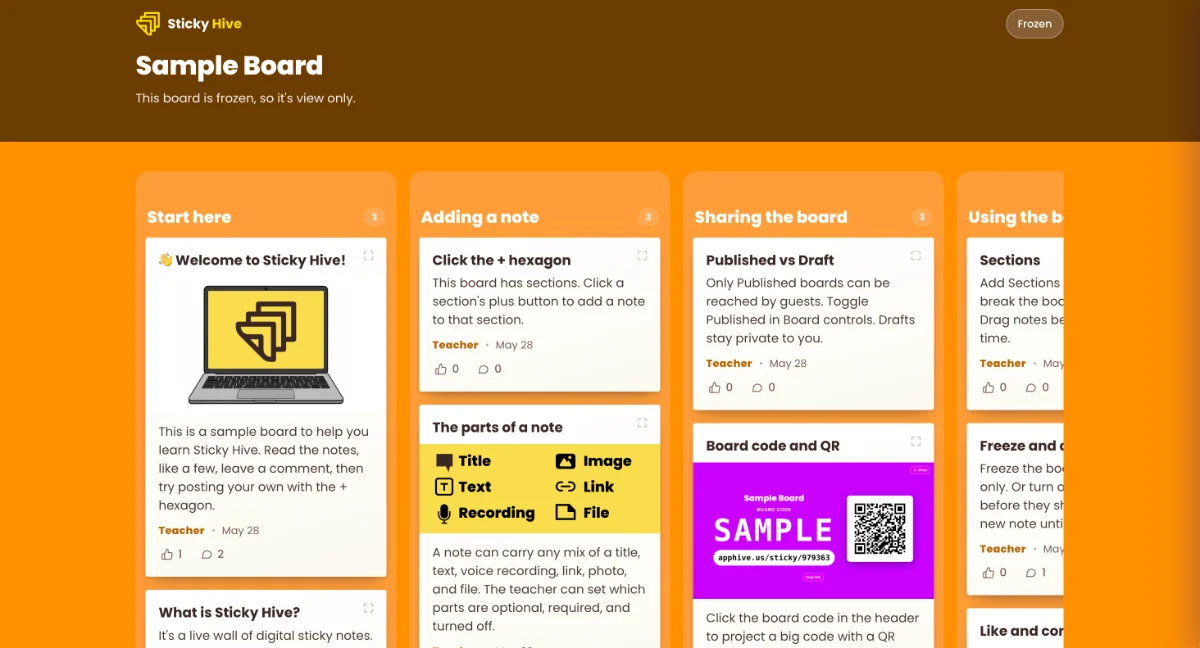
A Digital Board That Comes Alive
Create a board, share a code, and watch student contributions appear instantly.
Students can post:
- Text responses
- Links
- Photos
- PDFs and other files
- Voice recordings
As notes appear, everyone sees them immediately without refreshing the page.
Whether you're gathering exit tickets, brainstorming ideas, collecting research, sharing examples, or running a gallery walk, Sticky Hive gives every student a place to contribute.
No Accounts. No Logins. No Hassles.
One of Sticky Hive's biggest advantages is its simplicity. Students never create accounts, sign in, or provide names or email addresses. Instead, each participant receives a fun randomized screen name like BraveOtter or SunnyFox for the session. This keeps participation easy while protecting student privacy.
Designed for Classroom Flexibility
Sticky Hive can adapt to almost any learning activity.
Create sections to organize responses into columns such as:
- Agree / Disagree
- Warm-Up / Main Activity / Exit Ticket
- Station 1 / Station 2 / Station 3
- Research Topics
- Small Groups
You can also choose exactly what students are allowed to add. Want only written reflections? Require text and disable everything else. Want multimedia responses? Allow photos, recordings, links, and files.
Additional classroom-friendly features include:
- Commenting
- Likes
- One-post-per-student mode
- Moderation and approval queues
- Board freezing for "pencils down" moments
- Slideshow mode for reviewing responses together
Connected Superpower
Sticky Hive taps into Teacher Hive's Connected Superpower. Apps with this Superpower include a brown teacher toolbar along the bottom of the screen. From there, you can switch between Teacher View and Guest View. Students only see Guest View.
Teacher View is where you add boards, manage settings, review submissions, and control what students can do.
Students only see the Guest View. They join a board by URL, QR code, or board code.
The Connected Superpower means that everything stays synchronized in real time between Teacher View and Guest View, so responses, updates, and changes appear instantly for everyone.
Classroom Ideas to Try
Need inspiration? Here are a few ways teachers are already using digital sticky note boards:
Exit Tickets
Ask students to share one thing they learned, one question they still have, or one connection they made.
Brainstorming
Collect ideas before writing, problem-solving, or project planning.
Gallery Walks
Students post work samples, then leave comments on classmates' notes.
Check for Understanding
Gather quick responses during a lesson and adjust instruction in real time.
Multimedia Reflections
Have students submit photos, recordings, or links to demonstrate learning in different ways.
Student Questions
Create a parking lot where students can anonymously post questions throughout a unit.
Teachers Can Build Apps Like Sticky Hive
One of the most exciting parts of the Connected Superpower is that teachers can create their own collaborative apps. By providing your AI chatbot with Teacher Hive's Connected Superpower instructions, it can build activities that connect directly to Teacher Hive's backend, making features like real-time syncing, student participation, and teacher management possible, transforming simple AI-generated apps into dynamic classroom tools. Read the Help page, Building an app with the Connected Superpower.



2 Comments
If you've used Padlet before, Sticky Hive will feel familiar. Unlike Padlet's free plan, which limits teachers to 3 boards, Sticky Hive lets teachers create more than 100 boards at no cost. All of a teacher's Connected Superpowered apps share a monthly usage limit: 50,000 interactions for Teacher Hive Builders and 1 million interactions for Pro subscribers. I honestly don't know what that translates to in day-to-day classroom use, but my hunch is that it would take a lot of boards, posts, and student activity before most teachers would reach the limit.
Tony, this is fantastic. My school discontinued our padlet site license a couple years ago and I’ve been missing it ever since. I’m hopeful I may be able to give this a try this year with my middle schoolers.
Sticky Hive is no Padlet, but it does the job of a basic collaborative bulletin board. Let me know if you give it a try. The thing about vibe coding is that I can make changes based on feedback pretty easily. 😊
Sign in to leave a comment.